OPC UA Demo: Download the OOUAMiddleware ProductionCell
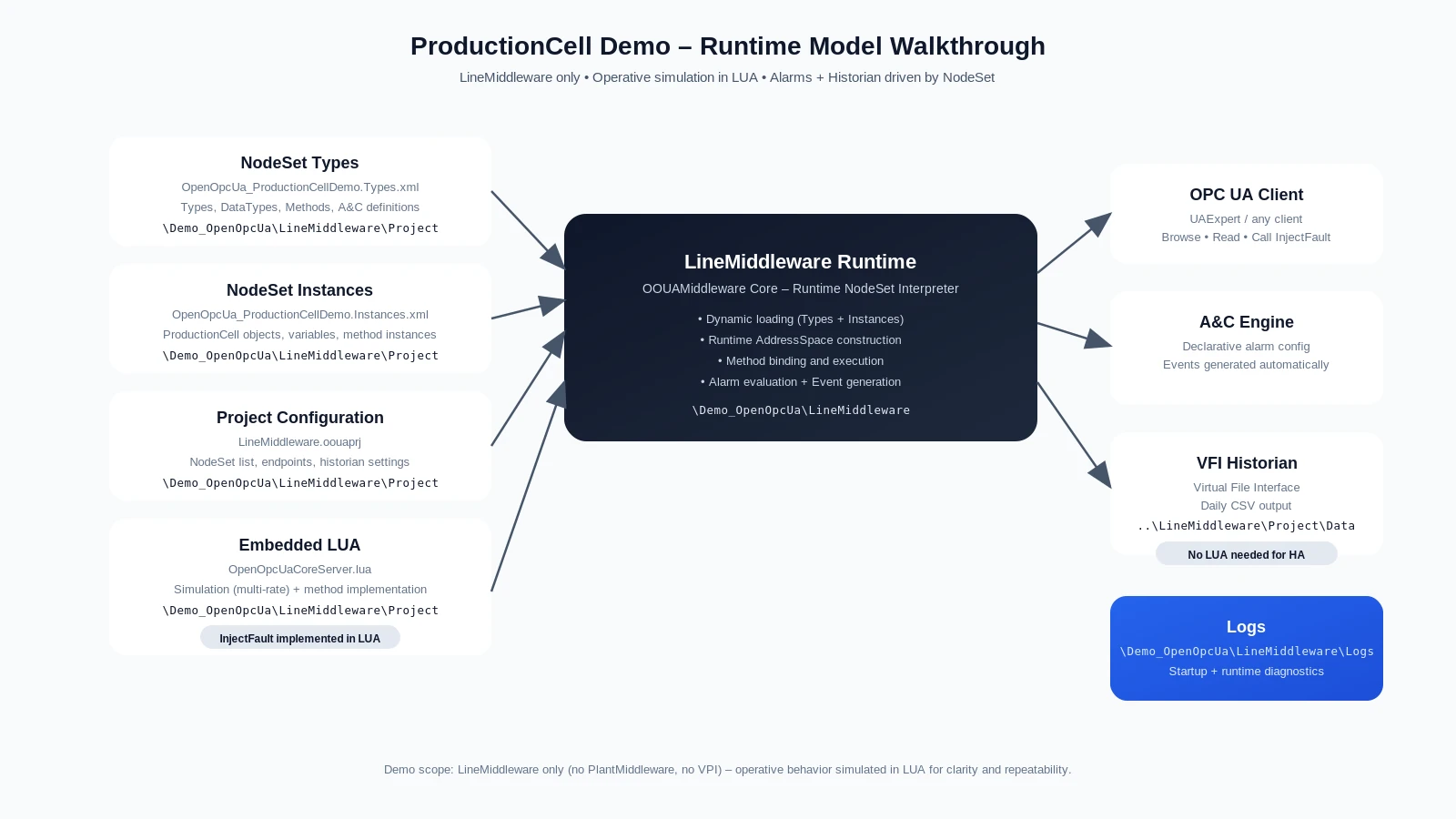
The ProductionCell demo is a working OOUAMiddleware evaluation environment designed to demonstrate the runtime model on a real OPC UA sample system. It shows how NodeSet Types and Instances are loaded dynamically, how embedded LUA drives runtime behavior, and how alarms, events and historian services are integrated into a live OPC UA AddressSpace.
What You Can Evaluate with This OPC UA Demo
This OPC UA demo is intended for technical evaluation. It helps you inspect how OOUAMiddleware handles runtime instantiation, embedded execution logic and service integration in a coherent OPC UA environment.
- Dynamic loading of NodeSet Types and Instances
- Live OPC UA AddressSpace construction
- Embedded LUA execution for runtime behavior
- Alarm and event generation
- Historian integration through VFI
- Practical evaluation of the OOUAMiddleware runtime model
See the ProductionCell Demo in Action
Runtime Model Walkthrough (NodeSet-first)
Watch the demo to see how the runtime model is instantiated, how simulation logic is executed, and how alarms and historian services are exposed in practice.
Request the Evaluation Package
Use the form below to request access to the ProductionCell demo package and evaluate how OOUAMiddleware handles NodeSet-driven runtime instantiation, embedded LUA execution, alarms and historian services in practice.
What the Demo Includes
The package includes the runtime binaries, project configuration, NodeSet models and quick start material required to launch the demo locally and inspect its structure.
- Windows runtime package (Binaries)
- OOUAMiddleware project configuration
- ProductionCell NodeSet type model
- ProductionCell NodeSet instance model
- Embedded LUA simulation script
- CSV historian output example (Data)
- Quick start guide
The package also includes the folder layout used by the demo: binaries, configuration, NodeSets, LUA script, logs, historian output and certificate store.
Quick Start
To launch the demo, extract the package, start the server, then connect with your OPC UA client to browse the runtime model and trigger a fault scenario.
Step-by-step
- Unzip the package
- Run
StartServer.bat- Default endpoint: opc.tcp://MachineName:2702/LineMiddleware
- Launch your OPC UA client
- Connect to the server
- Browse the ProductionCell model
- Call
InjectFault(2)
Understand the Demo
Embedded LUA Execution and Runtime Behavior
Behind the visible OPC UA model, the demo relies on embedded LUA execution to drive simulation logic, update runtime values and trigger alarms and events.
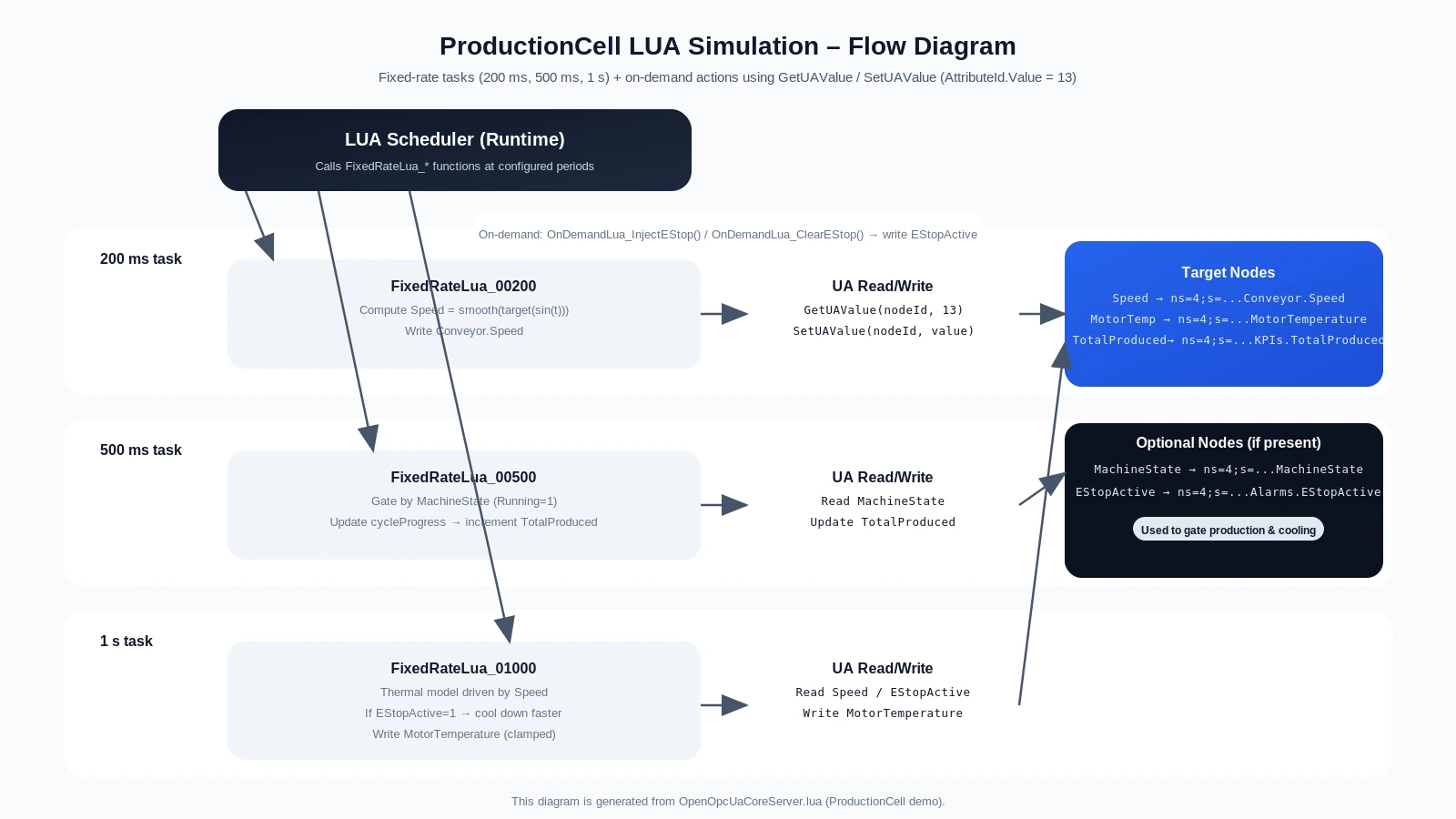
The LUA scheduler executes fixed-rate tasks and performs UA Read/Write operations to simulate behavior, update the runtime model and trigger observable runtime effects.
Explore the Runtime Model Architecture
This demo is the practical counterpart of the Runtime Model Architecture described in the documentation. If you want to understand the underlying concepts before running the package, start with the Runtime Model page.